
YCMOU Result: How to Check Grade Card and Marks
YCMOU exam results are published online as provisional results. Students can check their marks by selecting the exam event and entering their Permanent Registration Number (PRN) or Seat Number. The official Statement of Marks (SoM) issued by the university is considered final, not the online provisional result.
Key facts
| Online Results Status | Provisional only |
|---|---|
| Final Grade Card | Statement of Marks (SoM) issued by the university |
| PRN for Result Search | 16-digit Permanent Registration Number (PRN) |
| Revaluation Applications | Through e-suvidha account within stipulated time |
| Result Query Email | coe@ycmou.digitaluniversity.ac |
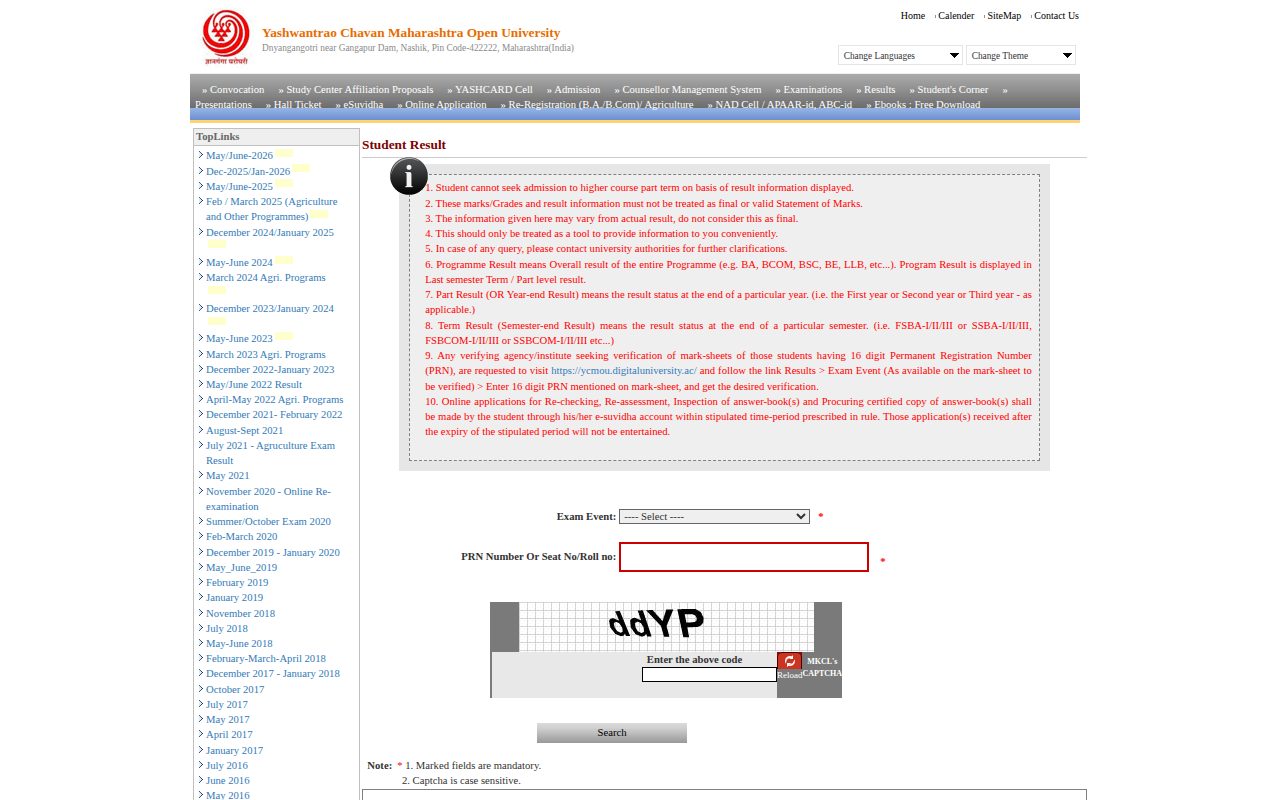
How to Check YCMOU Provisional Exam Results Online
YCMOU publishes examination results online as provisional results. You will need your Permanent Registration Number (PRN) or Seat Number to check your marks. The university provides different portals for result checking based on your PRN series.
Provisional eligible students’ results are not declared online. Such students must contact the Registration Section to confirm their admission status.
- If your PRN starts with 25 or 26, visit the YCMOU Result Portal and click the ‘Click Here’ button for PRN starting with 25,26.
- If your PRN starts with 20, visit the YCMOU Result Portal and click the ‘Click Here’ button for PRN starting with 20.
- Go to the YCMOU Online Provisional Result page.
- Select your ‘Exam Event’ from the dropdown menu (e.g., May/June-2026, Dec-2025/Jan-2026).
- Enter your 16-digit PRN Number or Seat No/Roll no.
- Enter the Captcha code shown on the page (it is case sensitive).
- Click the ‘Search’ button to view your result.
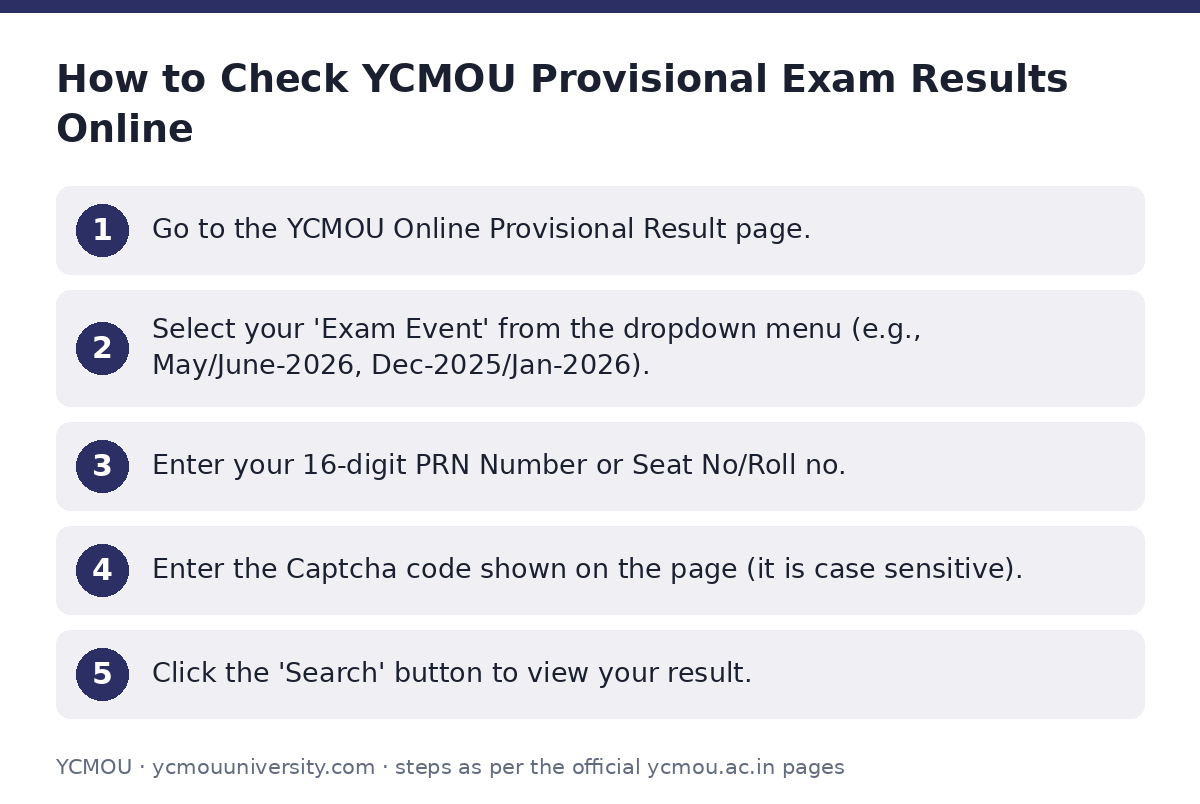
Understanding Your Provisional Result and Final Grade Card
All results published on the YCMOU Digital University portal are provisional. This means the online marks and grades are for informational purposes only and should not be considered final or valid Statement of Marks (SoM).
The Statement of Marks (SoM) officially issued to the student by the university will be considered as the final and valid grade card. Provisional results cannot be used to seek admission to a higher course or part-term.
In case of any discrepancy or query regarding your provisional result, you should contact the university authorities for clarification.
Applying for Verification, Scan Copy, or Revaluation
Students can apply for re-checking, re-assessment, inspection of answer-book(s), or procuring a certified copy of answer-book(s). These applications must be made online through your e-suvidha account.
Applications must be submitted within the stipulated time period prescribed in the rules. Applications received after the expiry of this period will not be entertained.
May/June 2022 Exam Revaluation/Scan Copy Application Deadlines
| Notification Date | Application Deadline |
|---|---|
| 17/08/2022 | 15/09/2022 (Extended for Revaluation) |
| 19/08/2022 | 31/08/2022 (Extended for Verification / Scan Copy / Revaluation) |
Checking Marksheet/Certificate Dispatch Status
You can check the dispatch status of your mark sheet or certificate online. This process helps you track if your physical documents have been sent and their current delivery status.
- If your mark sheet is returned to the university due to an incomplete, incorrect, or changed address, you or your representative must collect it from the Examination Section at the Nashik University headquarters after proper identification. Do not contact the university via letter or phone for this.
- Visit the Marksheet/Certificate Dispatch Status page.
- Find your program and exam event in the list and click on the ‘Click Here’ link next to it.
- On the opened list, press ‘Ctrl + F’ simultaneously to open the search box.
- Type your Permanent Registration Number (P.R.No.) in the search box and press ‘Enter’.
- Note down the Tracking Code displayed next to your PRN.
- Open one of the India Post tracking links: http://www.indiapost.gov.in/articleTracking.aspx or http://www.indiapost.gov.in/speednettracking.aspx.
- Enter your Tracking Code and the Verification Code (if required) on the India Post website to get the dispatch information.
Recent Result Announcements and Revaluation Results
Recent Results and Revaluation Results (as of 02 October 2026)
| Result Type | Date of Announcement |
|---|---|
| Summer Exam 2026 Result | 20/08/2026 |
| Degree Program Result | 15/08/2026 |
| Revaluation Result – Summer Exam 2026 | 20/08/2026 |
| Revaluation Result – Winter Exam 2026 | 15/08/2026 |
Contact for Result-Related Queries
If you have any questions or concerns regarding your results, you can contact the relevant university department. When sending an email, include your full name, Permanent Registration Number (P.R.No.), Seat Number, Exam Centre Name, Exam Centre Code (e.g., 5405A), Programme Name (e.g., B.A., B.Com), Programme Code (e.g., G01, P79), Subject Name, Subject Code (e.g., MAR250), and a brief, precise description of your query.
YCMOU Examination Department Contacts
| Department | Email ID |
|---|---|
| Result Department | result@ycmou.ac.in |
| Revaluation Department | revaluation@ycmou.ac.in |
| General Result Queries | coe@ycmou.digitaluniversity.ac |
Important YCMOU links
| What you can do | Official page |
|---|---|
| Check YCMOU provisional exam results | ycmou.digitaluniversity.ac/SearchDuplicateResult.aspx?ID=8 |
| Access YCMOU Result Portal by PRN | ycmou.digitaluniversity.ac/Content.aspx?ID=1523 |
| Track mark sheet dispatch status | ycmou.digitaluniversity.ac/Content.aspx?ID=1205 |
| View Examination Result information | ycmou.ac.in/student-zone/examination-result/ |
| Browse YCMOU Results page | ycmou.digitaluniversity.ac/Content.aspx?ID=861 |
Official documents (PDF)
- Click Here — Marksheet/Certificate Dispatch Status PDF — List of mark sheets returned to YCMOU for May 2016 exams
Frequently asked questions
Are YCMOU online results final?
No, all results published on the YCMOU Digital University portal are provisional. The Statement of Marks (SoM) issued by the university is considered final.
Can I use my provisional result for admission to a higher course?
No, provisional results cannot be used to seek admission to a higher course or part-term. You must use the final Statement of Marks (SoM).
How do I apply for revaluation or a scan copy of my answer sheet?
You must submit online applications for re-checking, re-assessment, or a scan copy through your e-suvidha account within the university’s stipulated time period.
What information should I provide when emailing about a result query?
Include your full name, PRN, Seat Number, Exam Centre details, Programme Name and Code, Subject Name and Code, and a precise description of your query.
What if my physical mark sheet is returned to the university?
If your mark sheet is returned due to an incorrect address, you or your representative must collect it from the Examination Section at the Nashik University headquarters after proper identification.
Sources
Written from the official YCMOU pages and documents below, as read on 2 October 2026.
- May/June 2022 Result ycmou.digitaluniversity.ac/…/Content.aspx
- July 2021 – Agruculture Exam Result ycmou.digitaluniversity.ac/…/Content.aspx
- Examination Result ycmou.ac.in/…/examination-result
- Marksheet/Certificate Dispatch Status ycmou.digitaluniversity.ac/…/Content.aspx
- Results ycmou.digitaluniversity.ac/…/Content.aspx
- Click Here — Marksheet/Certificate Dispatch Status ycmou.digitaluniversity.ac/…/Returned SOM-May 2016_new.pdf
- Click here for Online Provisional Result ycmou.digitaluniversity.ac/…/SearchDuplicateResult.aspx
- Result Dash Board ycmou.digitaluniversity.ac/…/Content.aspx