
YCMOU Hall Ticket 2026: Download Process, PRN Portal Login and Exam Centre
YCMOU distance learners can download their exam hall ticket for the 2026 sessions directly from the official Digital University portal. Candidates must select their exam event, enter their Permanent Registration Number (PRN) or User Name, and print the generated admit card for exam centre verification.
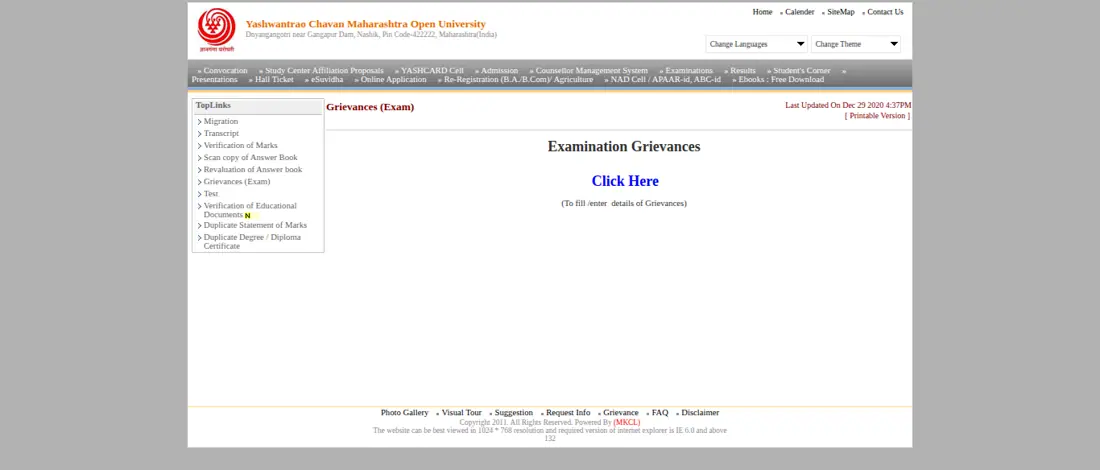
Students with PRN starting with 25 or 26 must access the dedicated online portal at ycmouops.dulive.ac. Candidates with PRN starting with 20 use the existing Digital University portal at ycmou.digitaluniversity.ac. Generating an Academic Bank of Credits (ABC) ID via DigiLocker is mandatory for YCMOU exam services. Exam hall ticket retrieval requires choosing the exact exam event such as May/June-2026 or Dec-2025/Jan-2026. Examination grievances can be submitted online through the dedicated YCMOU exam complaint portal.
Yashwantrao Chavan Maharashtra Open University (YCMOU), also known as YCMOU Nashik, issues online hall tickets for all undergraduate, postgraduate, diploma, and certificate examinations across distance learning sessions. Students preparing for the December 2025/January 2026 winter exams, May/June 2026 summer exams, or January 2027 sessions must generate their hall tickets through the official Digital University portal using their Permanent Registration Number (PRN). Downloading a valid printed hall ticket is mandatory for securing entry to designated examination centres across Maharashtra regional divisions.
YCMOU hall ticket 2026: portal update and exam events
Yashwantrao Chavan Maharashtra Open University publishes hall tickets online for all distance learning degree, diploma, and certificate programmes on its Digital University platform. Students enrolled in undergraduate courses like BA, B.Sc., or B.Com must download their admit card prior to the commencement of theory and practical end examinations.
The university updated its download services on 14 August 2026 to separate student logins based on PRN registration series. Candidates appearing for upcoming exam sessions must select the appropriate exam event from the portal dropdown list before submitting their search query.
YCMOU Official Exam Events List on Download Portal
| Exam Event Name | Session Details | Status |
|---|---|---|
| January-2027 | Upcoming Academic Term | Listed on Portal |
| Online Exam 2026 | Special Online Examination 2026 | Listed on Portal |
| May/June-2026 | Summer Examination Session 2026 | Listed on Portal |
| Dec-2025/Jan-2026 | Winter Examination Session 2025-2026 | Listed on Portal |
| September 2025 | Online Examination 2025 | Archive Event |
| May/June-2025 | Summer Examination Session 2025 | Archive Event |
| Feb/Mar-2025 | Agriculture and Special Sessions 2025 | Archive Event |
YCMOU admit card overview: candidate access and requirement
YCMOU hall tickets serve as the primary identity verification document for candidates attending term-end examinations across all recognized learner support centres in Maharashtra. Every hall ticket displays the student’s name, exam centre address, course codes, and scheduled paper dates.
Candidates cannot enter the examination hall without producing a printed copy of the official admit card generated from the portal. YCMOU has not published a separate list of secondary photo ID documents on its site as of 25 November 2026.
- Permanent Registration Number (PRN) or User Name
- Correct Exam Event selection matching the student’s registered session
- Verified 12-digit Academic Bank of Credits (ABC) ID
- Printed hard copy of the downloaded hall ticket
- Verification by study centre coordinator if requested
YCMOU hall ticket download procedure: step-by-step digital portal instructions
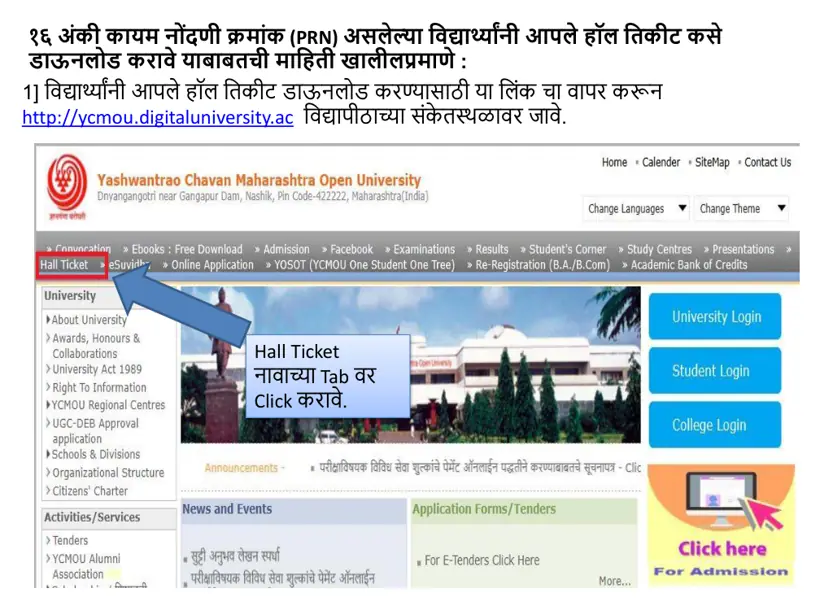
Students can obtain their exam admit card by accessing the official YCMOU hall ticket download page on the Digital University website. Following the correct sequence ensures error-free generation of the document.
Candidates must carefully solve the case-sensitive CAPTCHA code provided on the screen before clicking the search button. The step-by-step process below details how to navigate the portal.
- Open the official YCMOU Download Hall Ticket page or navigate to YCMOU Pre-Exam Download portal.
- Select your designated session from the Exam Event drop-down list (e.g., May/June-2026 or Dec-2025/Jan-2026).
- Enter your 16-digit Permanent Registration Number (PRN) or registered User Name in the field provided.
- Type the case-sensitive code displayed in the MKCL’s CAPTCHA box into the input field.
- Click the Search button to view your hall ticket on the screen.
- Click the Print button to download and print the hall ticket PDF for your examination.
More from YCMOU
YCMOU student login hall ticket: PRN series portal selection
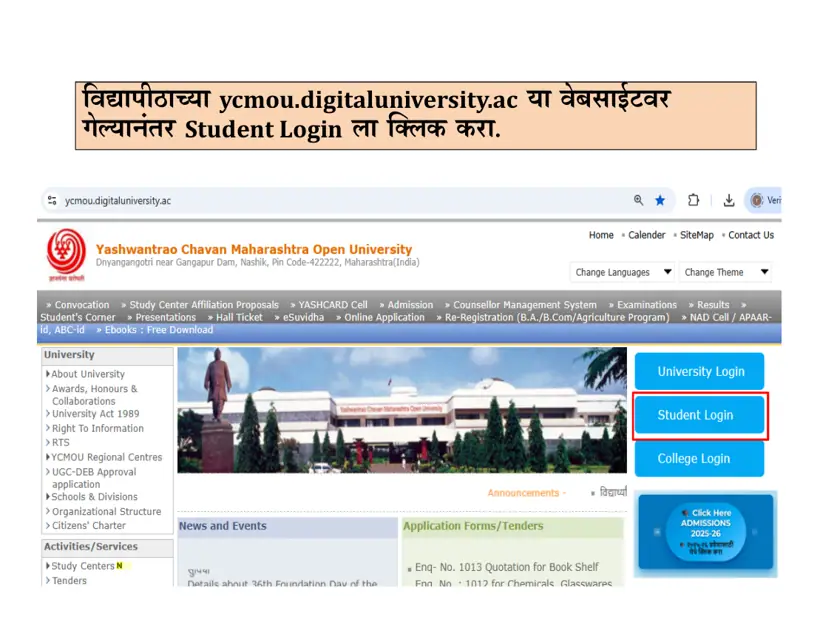
YCMOU routes hall ticket access based on the initial digits of a candidate’s Permanent Registration Number to manage system load effectively. Students must identify whether their PRN begins with 20 or with 25/26 before selecting the login link.
Using the wrong portal link for a specific PRN series will prevent the system from locating the student’s examination records. The portal allocation rules are summarized below.
YCMOU Portal Routing by PRN Registration Series
| PRN Starting Digits | Target Portal Name | Official Web Address Link |
|---|---|---|
| PRN starting with 25 or 26 | NEW PORTAL Student Login | ycmouops.dulive.ac/studentLogin/#/ycmou/studentLogin |
| PRN starting with 20 | Existing DU Portal | ycmou.digitaluniversity.ac |
YCMOU admit card details: mandatory information and portal inputs
The YCMOU hall ticket portal requires candidates to submit specific search fields before rendering the final admit card document. Students must ensure that all profile information matches their original university registration.
Once generated, the admit card lists critical details regarding the candidate’s paper schedule, study centre allotment, and seat numbers. Candidates should verify all printed entries immediately upon downloading.
- Student Full Name and Permanent Registration Number (PRN)
- Allocated Examination Centre Name and Centre Code
- Programme Name (e.g., BA 2nd Year, BA 3rd Year, B.Sc., or Advance Diploma)
- Course Codes and Subject Titles scheduled for the exam session
- Exam Date, Day, and Session Timings for each paper
- Student Photograph and Digital Signature placeholder
- Important instructions for candidates inside the examination hall
YCMOU hall ticket troubleshooting: ABC ID generation and grievance submission
Candidates experiencing hall ticket download errors or withheld admit cards often need to link their 12-digit Academic Bank of Credits (ABC) ID to their university profile. ABC IDs must be created on the DigiLocker portal using Aadhaar mobile OTP verification.
If a hall ticket contains incorrect student details or fails to display after proper PRN entry, students can submit an online complaint. The university provides an official examination grievance portal to resolve candidate issues promptly.
- Visit www.abc.gov.in and click My Account to select Student.
- Sign in using existing DigiLocker credentials or click New User Sign up for Meri Pehchan.
- Enter your Aadhaar-registered mobile number and click Generate OTP.
- Verify the OTP, set a Username and 6-digit PIN, and accept terms to complete sign up.
- Submit your verified 12-digit ABC ID through the official YCMOU ABC ID submission form.
- If admit card issues persist, visit the YCMOU Exam Grievance portal to register a formal complaint.
YCMOU exam hall ticket support: regional centre contact directory
Students who encounter persistent technical issues or missing hall tickets can contact their respective YCMOU Regional Centre for direct administrative assistance. Regional offices assist candidates in resolving exam form status, PRN errors, and hall ticket withholding.
Each regional centre manages specific districts across Maharashtra. Students can reach regional directors via official email accounts or direct telephone numbers during working hours.
YCMOU Regional Centre Contact Details for Exam Support
| Regional Centre | Official Email Address | Contact Phone Number |
|---|---|---|
| Amravati | rd_amravati@ycmou.digitaluniversity.ac | +91 94229 17111 |
| Aurangabad | rd_aurangabad@ycmou.digitaluniversity.ac | +91 94222 47293 |
| Mumbai | rd_mumbai@ycmou.digitaluniversity.ac | +91 99678 4965 |
| Nagpur | rd_nagpur@ycmou.digitaluniversity.ac | +91 94222 47295 |
| Nashik | rd_nashik@ycmou.digitaluniversity.ac | +91 75880 36388 |
| Pune | rd_pune@ycmou.digitaluniversity.ac | +91 94222 42298 |
| Kolhapur | rd_kolhapur@ycmou.digitaluniversity.ac | +91 94222 47294 |
| Nanded | rd_nanded@ycmou.digitaluniversity.ac | +91 72760 66398 |
YCMOU hall ticket next steps: examination preparation and hall entry
Candidates must print their generated admit card on clean A4 paper immediately after downloading it from the Digital University platform. Verify that all course codes listed on the admit card correspond to your registered subject modules for the current term.
Report any discrepancy in your name, exam centre, or subject details to your learner support centre coordinator or submit an online grievance before exam day. Carry your printed hall ticket to every examination session as scheduled.
- Check exam dates against the official YCMOU timetable on the Digital University portal.
- Ensure the printed hall ticket displays clear text and legible candidate details.
- Contact your regional centre if your hall ticket fails to generate 3 days prior to exams.
- Keep a digital PDF copy of the downloaded hall ticket saved on your mobile device.
What students ask about YCMOU Hall Ticket
How can candidates perform a YCMOU hall ticket download 2026?
Candidates must visit the official YCMOU Digital University download portal, choose their exam event from the drop-down menu, enter their 16-digit PRN or User Name, input the CAPTCHA code, and click Search to display and print their admit card.
Which portal supports the YCMOU login hall ticket process for 25 series PRN?
Students whose Permanent Registration Number starts with 25 or 26 must access the dedicated new portal at ycmouops.dulive.ac/studentLogin/#/ycmou/studentLogin to log in and download their exam hall ticket.
Can students attempt a YCMOU hall ticket download without PRN number?
No, YCMOU requires candidates to enter either a valid 16-digit Permanent Registration Number (PRN) or their registered User Name on the download portal to access and generate their exam admit card.
What exam events are available for YCMOU hall ticket 2026 download?
The download portal lists events including January-2027, Online Exam 2026, May/June-2026, and Dec-2025/Jan-2026. Candidates must select the exact event matching their registered exam session.
What action is required if an ABC ID issue blocks the YCMOU admit card?
Candidates must generate a 12-digit Academic Bank of Credits (ABC) ID on DigiLocker via www.abc.gov.in using Aadhaar OTP verification, then submit the ID through the official YCMOU ABC ID form to update their record.
How can repeaters access the YCMOU repeater exam hall ticket 2026?
Repeater candidates follow the standard download procedure on the Digital University portal by selecting their specific exam event (such as Dec-2025/Jan-2026 or May/June-2026) and entering their 16-digit PRN.
Where can candidates submit grievances regarding YCMOU exam hall ticket errors?
Students can submit examination complaints online through the official YCMOU Exam Grievance portal at ycmou.digitaluniversity.ac/RegisterComplaint.aspx or contact their respective Regional Centre.
Which regional office handles YCMOU Nashik hall ticket inquiries?
Nashik region students can contact the YCMOU Nashik Regional Centre via email at rd_nashik@ycmou.digitaluniversity.ac or call +91 75880 36388 for hall ticket and examination support.
Where to go on the YCMOU site
| What you can do | Official page |
|---|---|
| access YCMOU examination services and student tools | ycmou.ac.in ↗ |
| open main YCMOU hall ticket download portal page | ycmou.digitaluniversity.ac ↗ |
| view YCMOU digital university hall ticket section | ycmou.digitaluniversity.ac ↗ |
| access YCMOU direct admit card download search page | ycmou.digitaluniversity.ac ↗ |
| register online complaints regarding YCMOU exam grievances | ycmou.digitaluniversity.ac ↗ |
| access YCMOU student corner services and announcements | ycmou.ac.in ↗ |
Key facts
- University Name
- Yashwantrao Chavan Maharashtra Open University
- Portal Name
- YCMOU Digital University Portal
- Primary Credentials Needed
- 16-digit PRN or User Name
- PRN 25/26 Login Portal
- ycmouops.dulive.ac/studentLogin
- PRN 20 Login Portal
- ycmou.digitaluniversity.ac
- Mandatory Requirement
- 12-digit ABC ID via DigiLocker
- University Headquarters
- Dnyangangotri, Nashik – 422222
In this section
- YCMOU ATKT Form 2026: Online Submission Process and Portal Requirements
- How to Download YCMOU Exam Paper Formats and Old Sessions?
- YCMOU Previous Year Question Papers 2026: Download PDFs and Exam Patterns
- YCMOU Exam Time Table 2026: How to Find Your Term-End Schedule?
- How Do I Download a YCMOU OPN-101 Question Paper Online? BA Portal
- COE YCMOU Digitaluniversity AC Portal for Exam Forms and Hall Tickets
YCMOU Hall Ticket official links and PDFs
- https://ycmou.digitaluniversity.ac/WebFiles/How%20to%20Genrate%20ABC%20ID.pdf PDF — Step-by-step PDF guide for generating ABC ID via DigiLocker portal
Everything on YCMOU Exams
Exams
- COE YCMOU Digitaluniversity AC Portal for Exam Forms and Hall Tickets
- How to Download YCMOU Exam Paper Formats and Old Sessions?
- YCMOU Photocopy and Revaluation: Rules, Form-B Fees, and Link
Question Papers
- How Do I Download a YCMOU OPN-101 Question Paper Online? BA Portal
- YCMOU Agriculture Question Papers & Books PDF: AGR 101 to AGR 506
- YCMOU B.A. Question Papers PDF (G01): FYBA, SYBA & TYBA Course List
- YCMOU B.A. Urdu (G12) Question Papers & E-Books PDF: FYBA, SYBA & TYBA
- YCMOU B.Ed (P80, P21) & M.A. Education (M83) Question Papers & Books PDF
- YCMOU B.Lib (P04) & M.Lib (P16) Question Papers, Books & Syllabus PDF
- YCMOU BCA (UGP08, P131) Syllabus, Course Structure & Question Papers PDF
- YCMOU COM 106, COM 107 & COM 209 Question Papers: B.Com (G02) PDFs
- YCMOU Economics Question Papers: ECO 201, ECO 218, B.A. & M.A. Economics (M50)
- YCMOU English Question Papers: ENG 102, ENG 214 to ENG 545 & M.A. English (M87)
- YCMOU EVS 201 Question Paper & Environmental Studies Books PDF
- YCMOU Hindi Question Papers: HEN 101, HIN 212 to HIN 545 & B.A. Hindi (G11)
- YCMOU History Question Papers & Syllabus: HIS 220, B.A. & M.A. History (M60)
- YCMOU HUM 101, SOC 101, OPN 101, GKN 101 & HEN 101 Question Papers (FYBA G01)
- YCMOU Journalism & Mass Communication (G15, P03, M90) Question Papers PDF
- YCMOU M.Com (M17 / M117) Question Papers, Subjects & Prospectus PDF
- YCMOU Marathi Question Papers: MAR 101, MAR 102, B.A. & M.A. Marathi PDFs
- YCMOU MBA (P79) Question Papers & Semester 4 Home Assignments 2026-27 PDF
- YCMOU Political Science Question Papers: POL 224 to POL 365 & M.A. (M88)
- YCMOU Previous Year Question Papers: How to Download Subject-Wise PDFs?
- YCMOU Psychology Question Papers: PSY 216 to PSY 395 & M.A. Psychology (M89)
- YCMOU Sociology Question Papers: SOC 101, SOC 281 to SOC 475 & M.A. (M86)