
YCMOU Hall Ticket 2026: Download Process, PRN Portal Login and Exam Centre
YCMOU releases hall tickets online for undergraduate, postgraduate, and agriculture exam events including May/June 2026 and Dec 2026/Jan 2027 on its official portals. Candidates with PRNs starting with 25 or 26 log in through the new portal, while PRNs starting with 20 use the Digital University portal to search by PRN or User Name.
YCMOU candidates with PRNs starting with 25 or 26 must download hall tickets from the new student login portal. Candidates with PRNs starting with 20 select their exam event and enter PRN or User Name on the Digital University portal. YCMOU exam events listed on the hall ticket portal include January 2027, Online Exam 2026, May/June 2026, and Dec 2025/Jan 2026. Students must generate and submit their 12-digit Academic Bank of Credits (ABC) ID on the YCMOU portal before examination services. Exam-related hall ticket errors or grievances can be submitted online under the Examination category on the YCMOU complaint portal.
Yashwantrao Chavan Maharashtra Open University (YCMOU), located in Nashik, Maharashtra, issues online hall tickets for all undergraduate, postgraduate, diploma, and repeater examinations across distance and online learning programs. Students appearing for exam events such as May/June 2026, August/September 2026, Dec 2026/Jan 2027, or January 2027 must download their hall ticket prior to attending theory or practical examinations. The university provides separate hall ticket download portals based on the candidate’s Permanent Registration Number (PRN) prefix. Learners with a PRN starting with 25 or 26 access the new portal, whereas candidates with a PRN starting with 20 use the existing Digital University portal.
YCMOU hall ticket notice: May/June 2026 and Winter Exam Updates
YCMOU published official examination time tables on 20 August 2026 and 15 August 2026 for Summer Exam 2026 and Winter Exam 2026 events. Students in BA 2nd year, BA 3rd year, and postgraduate programmes access notices via the YCMOU time table portal.
Candidates must complete their exam form submission and verify hall ticket release dates prior to appearing at assigned exam centres. The university updated the portal on 25 August 2026 to organize exam schedules, hall ticket links, and result portals.
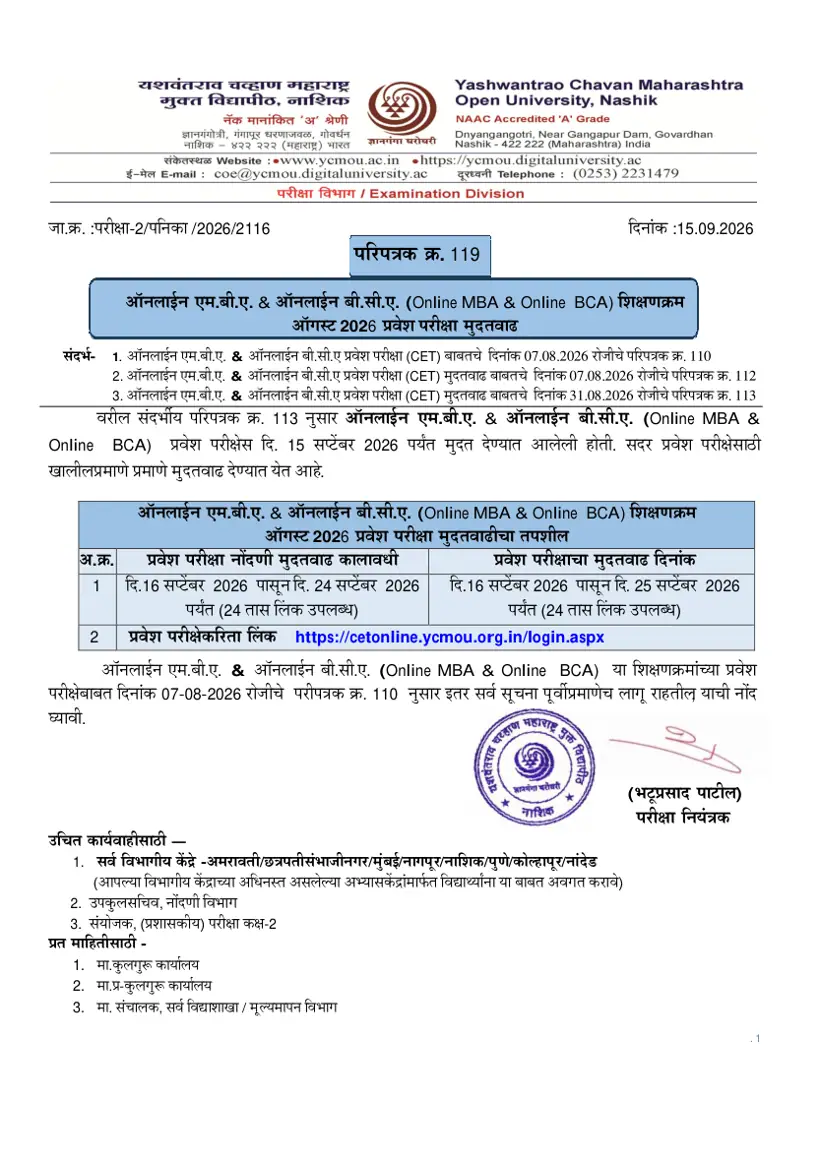
YCMOU hall ticket overview: Purpose and Mandatory Credentials
YCMOU issues mandatory hall tickets for undergraduate and postgraduate students appearing in May/June 2026 and Dec 2026/Jan 2027 examination events. Candidates must present this official pass for theory, practical, online, and repeater exams at Maharashtra regional centres.
Accessing admit cards requires a 16-digit Permanent Registration Number or official User Name with an active 12-digit Academic Bank of Credits ID. YCMOU requires learners to complete the ABC ID form on the portal after creation.
- DigiLocker portal link (digilocker.meripehchaan.gov.in/signin/) for generating the 12-digit ABC ID
- Sample 16-digit PRN format example: 2501033500010083
- Case-sensitive MKCL captcha entry requirement on the hall ticket portal
- PDF user guide (How to Genrate ABC ID.pdf) available for step-by-step ABC ID creation
YCMOU hall ticket highlights: Portals, Exam Events and Credentials
YCMOU provides hall tickets through two dedicated web portals based on the candidate’s PRN registration prefix. The university has updated exam events for the 2025–2026 academic calendar across multiple degree levels.
YCMOU Hall Ticket Portal and Exam Event Summary
| PRN Prefix / Category | Portal Name | Search / Login Credentials | Available Exam Events |
|---|---|---|---|
| PRN starting with 25 or 26 | New Portal (ycmouops.dulive.ac) | Student Login Credentials | January-2027, Online Exam 2026, May/June-2026 |
| PRN starting with 20 | Existing DU Portal (ycmou.digitaluniversity.ac) | PRN or User Name + Captcha | May/June-2026, Dec-2025/Jan-2026, September 2025 |
| Agriculture Programmes | Digital University Hall Ticket Portal | PRN or User Name + Exam Event | Feb/Mar-2025, Dec-2025/Jan-2026 |
More from YCMOU
YCMOU hall ticket download procedure: Step-by-Step Portal Process
Candidates must follow specific online steps on the official YCMOU portal to download and print their hall tickets for upcoming term-end examinations. Selecting the correct portal based on your PRN prefix ensures smooth access to your admit card.
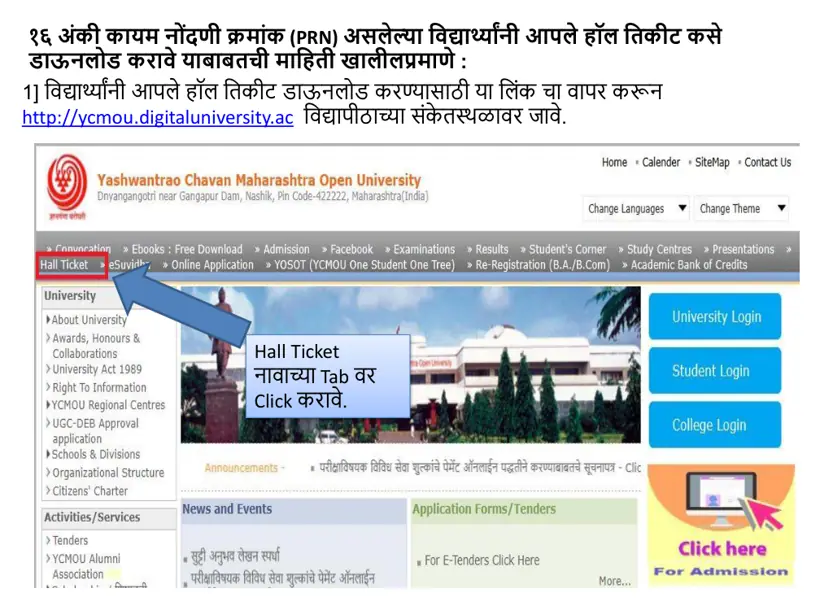
- Visit the YCMOU Download Hall Ticket portal or navigate directly to the YCMOU hall ticket search page.
- Check your Permanent Registration Number (PRN) prefix to select the appropriate download link.
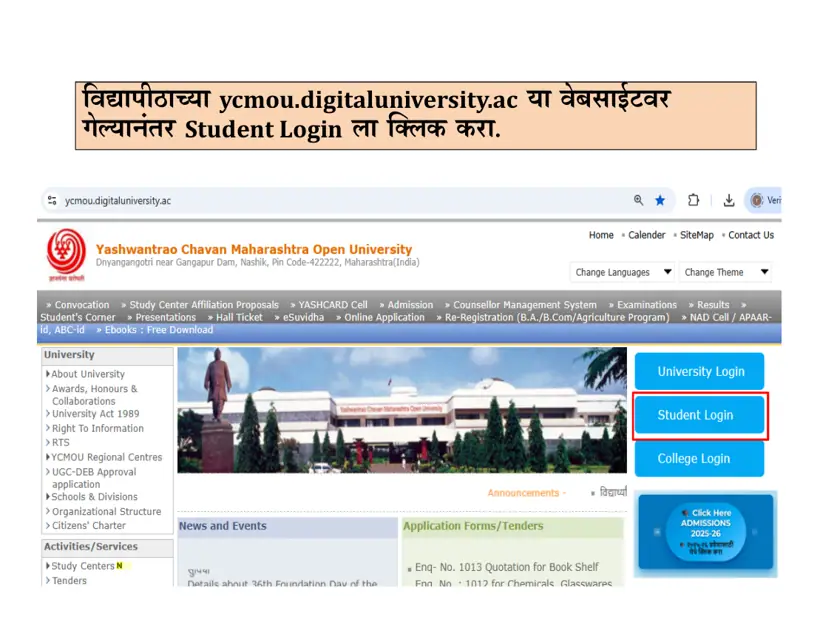
- If your PRN starts with 25 or 26, click the New Portal link to access the student login page at ycmouops.dulive.ac.
- If your PRN starts with 20, select your specific exam event such as May/June-2026 or Dec-2025/Jan-2026 from the dropdown menu.
- Enter your 16-digit PRN (e.g., 2501033500010083) or User Name into the designated search field.
- Enter the MKCL Captcha code exactly as displayed on the screen and click the Search button.
- Click the Print button to open your YCMOU hall ticket PDF, then download and print a clear physical copy for your exam.
YCMOU admit card details: Exam Centre Code and Student Information
The YCMOU hall ticket contains essential examination metadata, candidate identity details, and study centre instructions required on exam days. Candidates must verify all printed fields immediately after downloading the admit card.
- Candidate Full Name and Photo
- 16-Digit Permanent Registration Number (PRN)
- User Name and Seat Code
- Programme Name and Academic Session (e.g., BA 2nd Year, BA 3rd Year)
- Exam Event Name (e.g., May/June-2026, Dec-2025/Jan-2026)
- Assigned Exam Centre Name and Centre Code
- Course / Subject Codes and Paper Titles
- Exam Date, Day, and Session Timings
- University Controller of Examinations Seal and Instructions
YCMOU hall ticket grievance redressal: Resolving Errors Online
Students who discover errors in their printed hall ticket details or experience portal login failures must register an online complaint through the YCMOU grievance portal. The university processes pre-examination and post-examination queries through its dedicated portal.
- Open the YCMOU online complaint portal or access Examination Services via YCMOU examination services.
- Select “Examination: (Pre-Examination / Post Examination)” from the Subject Type dropdown menu.
- Choose your specific problem from the Subject dropdown menu.
- Enter your full name, reference number or previous complaint number, active email ID, and mobile number.
- Type a detailed description of your hall ticket issue into the Complaint Details text box.
- Enter the MKCL Captcha code shown on the screen and click the Submit button to receive your complaint tracking number.
YCMOU repeater exam hall ticket download: Back Paper Student Access
Repeater candidates appearing for back papers or backlog examinations in May/June 2026 or Dec 2025/Jan 2026 use the same hall ticket portal as fresh candidates. Backlog subject codes and exam dates are printed directly on the main admit card document.
To access repeater admit cards, candidates enter their PRN or User Name on the YCMOU Digital University hall ticket page and select their respective exam event. Repeater students whose PRN starts with 25 or 26 must log in to the new student portal to print back paper hall tickets.
YCMOU hall ticket next steps: Exam Day Preparation and Verification
After downloading the YCMOU hall ticket 2026, candidates must verify all printed course codes against their official time table and secure a physical copy. Learners must carry their printed hall ticket along with a valid government photo ID or YCMOU identity card to the allotted examination centre.
Students should retain a digital PDF copy of their admit card throughout the examination event until official results are declared. Check your assigned exam centre location in advance to ensure punctual arrival on exam days. YCMOU has not published separate exam centre change rules or downloadable exam centre PDFs on its site as of 31 October 2026.
What students ask about YCMOU Hall Ticket
How can I do YCMOU hall ticket 2026 pdf download for BA 3rd year?
Students can download the YCMOU BA 3rd year hall ticket 2026 by visiting the YCMOU hall ticket portal or logging into ycmouops.dulive.ac. If your PRN starts with 25 or 26, log in to the new portal; if it starts with 20, select May/June-2026 or Dec-2025/Jan-2026 event, enter your 16-digit PRN, fill the captcha, and click Search. Once displayed, click Print to save your BA 3rd year admit card PDF.
What is the process for YCMOU repeater exam hall ticket 2026 download?
Repeater students download their YCMOU repeater exam hall ticket 2026 using the same portal as regular students. Navigate to the YCMOU Digital University hall ticket page, choose your repeater exam event (such as May/June-2026 or Dec-2025/Jan-2026), enter your PRN or User Name, and click Search. Candidates with PRNs starting with 25 or 26 must log in to ycmouops.dulive.ac to download repeater admit cards.
How do I download YCMOU hall ticket without PRN number?
Students downloading a hall ticket without a PRN number can enter their official User Name instead on the YCMOU hall ticket portal. Select your exam event, type your User Name in the “OR User Name” field, complete the MKCL captcha, and click Search. If you have forgotten both your PRN and User Name, use the “Search PRN” feature on the Digital University portal.
Where can I find the YCMOU digital university hall ticket download link?
The official YCMOU digital university hall ticket download link is available at ycmou.digitaluniversity.ac under the Hall Ticket section. Candidates with PRNs starting with 20 use the Digital University hall ticket search page directly. Candidates whose PRN starts with 25 or 26 are redirected from YCMOU download hall ticket portal to the new student login page.
How can students download YCMOU BA 2nd year hall ticket 2026?
YCMOU BA 2nd year students can download their 2026 hall ticket online at the YCMOU Digital University portal. Select the May/June-2026 or appropriate exam event, enter your 16-digit PRN or User Name, solve the MKCL captcha, and click Search. Review your printed BA 2nd year subjects, exam dates, and exam centre code before saving the PDF.
What should I do if there is an error on my YCMOU admit card 2026?
If your YCMOU admit card 2026 contains incorrect personal details, missing subjects, or wrong centre information, submit an online complaint via the YCMOU grievance portal. Select “Examination: (Pre-Examination / Post Examination)” as the Subject Type, choose your specific problem, and enter your contact details with complaint text. The university examination division in Nashik reviews and resolves submitted hall ticket grievances.
Which portal is used for YCMOU student login hall ticket download for PRN 25 or 26?
Candidates with PRNs starting with 25 or 26 must use the YCMOU new student portal at ycmouops.dulive.ac for hall ticket downloads. Access the link through the YCMOU hall ticket page, enter your student login credentials, and download your admit card for the active exam event. Existing students with PRN starting with 20 continue using the Digital University portal.
Are old hall tickets like YCMOU hall ticket 2019 or 2025 still accessible online?
The YCMOU Digital University hall ticket portal retains active exam events up to past sessions such as Feb/March 2024, May/June 2024, December 2024, May/June 2025, and September 2025. Older exam hall tickets from 2019 or May 2019 are archived once examination events conclude. Students requiring historic exam records must contact the YCMOU Examination Division directly.
Is an ABC ID mandatory for downloading the YCMOU hall ticket 2026?
Yes, submitting a valid 12-digit Academic Bank of Credits (ABC) ID is mandatory for accessing YCMOU examination services. Students must generate their 12-digit ABC ID through DigiLocker prior to hall ticket download and examination processes. After generating the ID, candidates must complete the official ABC ID submission form provided on the hall ticket portal. Ensure your 12-digit number is entered accurately to avoid any disruption to your exam services.
When are YCMOU hall tickets 2026 released for summer and winter exams?
YCMOU published official examination time tables on 20 August 2026 for Summer Exam 2026 and on 15 August 2026 for Winter Exam 2026. Hall tickets are uploaded on the digital university portals prior to term-end theory and practical exams. Students can verify published notices under the Time Table section of ycmou.digitaluniversity.ac before downloading admit cards. If your schedule is missing, check the latest circulars released by the YCMOU examination division in Nashik.
What documents must students carry alongside the YCMOU hall ticket 2026 to the exam centre?
Students must carry a printed hard copy of their YCMOU hall ticket 2026 along with a valid government photo ID or official YCMOU identity card to the examination centre. Candidates must verify their assigned exam centre code, course codes, and session timings printed on the admit card before exam day. It is recommended to retain a saved PDF copy on your device until final results are announced. Entry to the examination hall is denied without a physical hall ticket and valid photo identification.
Which exam events are listed on the YCMOU digital university hall ticket portal for 2026 exams?
The YCMOU Digital University hall ticket portal lists active exam events including January-2027, Online Exam 2026, May/June-2026, and Dec-2025/Jan-2026. Students select their specific exam session from the Exam Event dropdown menu on ycmou.digitaluniversity.ac before searching by PRN or User Name. Archived exam events such as September 2025 and May/June-2025 also remain selectable on the portal. If your exam session does not appear, verify published timetable circulars from the YCMOU examination division in Nashik.
How can students use the PRN search feature on the YCMOU portal to get their hall ticket?
Students who do not know their Permanent Registration Number can use the Search PRN link on the YCMOU portal at ycmou.digitaluniversity.ac. Enter your registered student details or official User Name into the search fields to locate your 16-digit PRN. After finding your number, return to the hall ticket page, select your exam event such as May/June-2026, solve the captcha, and click Search. If retrieval fails, register a complaint through the YCMOU examination grievance portal.
Where to go on the YCMOU site
| What you can do | Official page |
|---|---|
| Access YCMOU hall ticket portal for PRN selection | ycmou.digitaluniversity.ac ↗ |
| Search YCMOU hall ticket by PRN or User Name | ycmou.digitaluniversity.ac ↗ |
| View YCMOU exam time table and notices | ycmou.digitaluniversity.ac ↗ |
| Submit YCMOU examination grievances online | ycmou.digitaluniversity.ac ↗ |
| Access YCMOU online examination services | ycmou.ac.in ↗ |
Key facts
- University Name
- Yashwantrao Chavan Maharashtra Open University (YCMOU)
- Document Name
- Hall Ticket / Admit Card
- PRN 25 & 26 Portal
- YCMOU New Student Login Portal
- PRN 20 Portal
- YCMOU Existing Digital University Portal
- Search Credentials
- 16-digit PRN or User Name with Captcha
- Mandatory ID Requirement
- 12-digit ABC ID (DigiLocker)
- Exam Events Available
- January-2027, Online Exam 2026, May/June-2026, Dec-2025/Jan-2026
In this section
- YCMOU ATKT Form 2026: Online Submission Process and Portal Requirements
- How to Download YCMOU Exam Paper Formats and Old Sessions?
- YCMOU Previous Year Question Papers 2026: Download PDFs and Exam Patterns
- YCMOU Exam Time Table 2026: How to Find Your Term-End Schedule?
- How Do I Download a YCMOU OPN-101 Question Paper Online? BA Portal
- COE YCMOU Digitaluniversity AC Portal for Exam Forms and Hall Tickets
YCMOU Hall Ticket official links and PDFs
- Click Here — Examination Services PDF — YCMOU official examination circular PDF
Everything on YCMOU Exams
Exams
- COE YCMOU Digitaluniversity AC Portal for Exam Forms and Hall Tickets
- How to Download YCMOU Exam Paper Formats and Old Sessions?
- YCMOU Photocopy and Revaluation: Rules, Form-B Fees, and Link
Question Papers
- How Do I Download a YCMOU OPN-101 Question Paper Online? BA Portal
- YCMOU Agriculture Question Papers & Books PDF: AGR 101 to AGR 506
- YCMOU B.A. Question Papers PDF (G01): FYBA, SYBA & TYBA Course List
- YCMOU B.A. Urdu (G12) Question Papers & E-Books PDF: FYBA, SYBA & TYBA
- YCMOU B.Ed (P80, P21) & M.A. Education (M83) Question Papers & Books PDF
- YCMOU B.Lib (P04) & M.Lib (P16) Question Papers, Books & Syllabus PDF
- YCMOU BCA (UGP08, P131) Syllabus, Course Structure & Question Papers PDF
- YCMOU COM 106, COM 107 & COM 209 Question Papers: B.Com (G02) PDFs
- YCMOU Economics Question Papers: ECO 201, ECO 218, B.A. & M.A. Economics (M50)
- YCMOU English Question Papers: ENG 102, ENG 214 to ENG 545 & M.A. English (M87)
- YCMOU EVS 201 Question Paper & Environmental Studies Books PDF
- YCMOU Hindi Question Papers: HEN 101, HIN 212 to HIN 545 & B.A. Hindi (G11)
- YCMOU History Question Papers & Syllabus: HIS 220, B.A. & M.A. History (M60)
- YCMOU HUM 101, SOC 101, OPN 101, GKN 101 & HEN 101 Question Papers (FYBA G01)
- YCMOU Journalism & Mass Communication (G15, P03, M90) Question Papers PDF
- YCMOU M.Com (M17 / M117) Question Papers, Subjects & Prospectus PDF
- YCMOU Marathi Question Papers: MAR 101, MAR 102, B.A. & M.A. Marathi PDFs
- YCMOU MBA (P79) Question Papers & Semester 4 Home Assignments 2026-27 PDF
- YCMOU Political Science Question Papers: POL 224 to POL 365 & M.A. (M88)
- YCMOU Previous Year Question Papers 2026: Download PDFs and Exam Patterns
- YCMOU Psychology Question Papers: PSY 216 to PSY 395 & M.A. Psychology (M89)
- YCMOU Sociology Question Papers: SOC 101, SOC 281 to SOC 475 & M.A. (M86)