
YCMOU Online Provisional Results Released for Exam Sessions 1, 2 and 3
YCMOU Provisional Results: Highlights
YCMOU has updated its portal with online links for checking provisional examination results across multiple sessions.
YCMOU Result Overview
| Particulars | Details |
|---|---|
| University Name | Yashwantrao Chavan Maharashtra Open University (YCMOU) |
| Announcement | Online Provisional Examination Results |
| Sessions Included | Exam Session 1, Exam Session 2, Exam Session 3 |
| Mode of Result Access | Online Link / Portal |
| Grievance Redressal Email | coe@ycmou.digitaluniversity.ac |
YCMOU Exam Sessions Covered in Result Portal
The provisional examination result portal provides session-wise links to access marks for various academic and professional courses.
Sessions and Exam Events Covered
| Session | Exam Events Included |
|---|---|
| Exam Session 1 | Dec 2022 – Jan 2023, December 2021, May 2021 |
| Exam Session 2 | May – June 2022, Aug – Sept 2021 |
| Exam Session 3 | April – May 2022 Agriculture, July 2021 – Agriculture |
How to Check YCMOU Online Provisional Result
- Go to the official YCMOU Online Provisional Result page or the YCMOU Examination Result portal.
- Select your designated exam session (Exam Session 1, Exam Session 2, or Exam Session 3) or choose the relevant exam event (e.g., May/June 2026).
- Students whose Permanent Registration Number (PRN) starts with ’25’ must access the dedicated student login link provided on the YCMOU Results page.
- View and print the provisional result displayed on the screen.
More from YCMOU
Details Required for Submitting Result Queries
All results hosted on the digital university portal are provisional. The Statement of Marks (SoM) issued to the student will be considered final. If a student notices any discrepancies or has doubts regarding the provisional result, an email must be sent to coe@ycmou.digitaluniversity.ac including the following details:
- Full Name of the student
- Permanent Registration Number (P.R.No.)
- Seat Number (Asan Kramank)
- Examination Centre Name
- Examination Centre Code (e.g., 5405A, 6203A)
- Programme Name (e.g., B.A., B.Com., M.B.A.)
- Programme Code (e.g., G01, G02, P79)
- Subject Name
- Subject Code (e.g., MAR250, HIS280)
- Brief and precise explanation of the doubt or query
What Students Should Do Next
- Verify all personal details, subject names, and subject codes listed in the online result.
- If your admission is provisionally eligible, note that your result will not be declared online until you contact the Registration Section and confirm your admission.
- If you discover errors in your result, send a complete email query to the Controller of Examinations.
- Keep track of the official physical Statement of Marks (SoM) issued by YCMOU, which serves as the final document.
What students ask about this YCMOU notice
Are the online YCMOU exam results final?
No, all exam results published on the YCMOU digital university portal are strictly provisional. The physical Statement of Marks (SoM) issued by the university serves as the final official record for all candidates across exam events like May/June 2026. Students cannot seek admission to higher courses or part terms solely based on these online provisional marks. If any discrepancy or variation appears between online marks and actual records, email your complete details to coe@ycmou.digitaluniversity.ac for clarification.
How can I report an issue with my YCMOU provisional result?
You must report result discrepancies by emailing the Controller of Examinations at coe@ycmou.digitaluniversity.ac. Provide your full name, 16-digit Permanent Registration Number (PRN), seat number, examination centre name, centre code like 5405A, programme name, programme code like G01, subject name, subject code, and a brief issue explanation. This grievance process applies to all sessions, including the May/June 2026 exam event. If your issue remains unresolved, you may visit the university headquarters examination section at Nashik.
Why is my YCMOU exam result not declared online?
Your result is withheld online if your admission status is marked as provisionally eligible by YCMOU. This rule applies across all examination sessions, including the recent May/June 2026 exam event on the digital university portal. To release your withheld marks, you must contact the YCMOU Registration Section directly and submit required documentation to confirm your admission status. If you fail to get your admission confirmed with the registration department, your provisional result will remain unannounced.
Where should students with PRNs starting with ’25’ check their results?
Students whose PRN starts with ’25’ or ’26’ must check their provisional results via the dedicated link at ycmouops.dulive.ac/studentLogin/#/ycmou/studentLogin. On the login portal, select your applicable exam event such as May/June 2026, enter your registration details, solve the captcha, and click search. Students with PRNs starting with ’20’ must use the alternate link provided on ycmou.digitaluniversity.ac. If login errors occur, contact the examination section email at exam@ycmou.ac.in for technical assistance.
Which exam sessions are included in the provisional results notice?
The provisional results notice covers Exam Session 1, Exam Session 2, and Exam Session 3 published on the portal. Exam Session 1 includes Dec 2022–Jan 2023, December 2021, and May 2021 exams, while Exam Session 2 covers May–June 2022 and Aug–Sept 2021. Exam Session 3 includes April–May 2022 Agriculture and July 2021 Agriculture programs. Students searching for recent sessions like May/June 2026 must select the specific event drop-down on ycmou.digitaluniversity.ac or contact coe@ycmou.digitaluniversity.ac if missing.
How do external verifying agencies verify YCMOU mark sheets with a 16-digit PRN?
External verifying agencies must visit ycmou.digitaluniversity.ac and navigate to the Results section to verify 16-digit PRN mark sheets. On the portal, the agency selects the exact Exam Event displayed on the mark sheet to be verified, inputs the candidate’s 16-digit Permanent Registration Number, and submits the captcha code. The system then displays the official provisional result details corresponding to that student. If any verification query remains unresolved, the agency can contact result@ycmou.ac.in.
What should YCMOU students do if their physical mark sheet is returned undelivered?
If a physical mark sheet is returned due to an incomplete address or address change, the student must collect it in person from YCMOU headquarters. Students or their authorized representatives must visit the Examination Section at Dnyangangotri near Gangapur Dam, Nashik Pin 422222 with valid identity proof. You can check your postal speed post tracking code under the Marksheet Dispatch Status link on the digital university website. Avoid making separate phone or letter inquiries.
How do YCMOU students apply online for answer book scan copies or revaluation?
Students must submit online applications for re-checking, re-assessment, inspection, or certified scan copies of answer books through their e-Suvidha account. Applications must be submitted strictly within the stipulated time frame prescribed by the university rules, such as extended deadlines like 15/09/2022 for May/June 2022 exams. Applications submitted after the expiry of the prescribed period will not be entertained by the university. For online revaluation support, email revaluation@ycmou.ac.in directly.
How do students submit their 12-digit ABC ID or APAAR ID to YCMOU?
Students must create their 12-digit Academic Bank of Credits (ABC ID) or APAAR ID through the DigiLocker portal at digilocker.meripehchaan.gov.in. After generating the ID, students must fill out the official YCMOU Google form link provided on the result portal to record their details correctly. A step-by-step presentation guide is also hosted on ycmou.digitaluniversity.ac under WebFiles. Submitting this correct 12-digit ID ensures proper academic credit accumulation and seamless result processing.
What steps are required to check YCMOU results on the main portal using PRN?
Visit ycmou.digitaluniversity.ac and click on the Examination Result button to access the search form. Select your specific Exam Event from the dropdown menu, such as May/June-2026 or Dec-2025/Jan-2026. Enter your 16-digit Permanent Registration Number (PRN) or Seat Number in the mandatory field, type the case-sensitive captcha code, and click Search. If the captcha or portal fails to load, click Reload MKCL CAPTCHA or refresh your browser.
Where can agricultural program students check YCMOU July 2021 exam results?
Students enrolled in agricultural courses can access July 2021 provisional exam results directly on ycmou.digitaluniversity.ac under the July 2021 Agriculture Result section. This section lists programs like Certificate in Gardening (C1D), Foundation in Agricultural Sciences (T12), Diploma in Horticulture (T20), and B.Sc. Agriculture (T19). Select your program name, click the corresponding result link, and enter your 16-digit PRN to view marks. For missing agri results, email coe@ycmou.digitaluniversity.ac for support.
How can YCMOU students track the postal dispatch status of their physical mark sheet?
Students can track physical mark sheet delivery status online using the Speed Post tracking code published on ycmou.digitaluniversity.ac. Navigate to the Marksheet/Certificate Dispatch Status link, open your program list, and press Ctrl+F to find your 16-digit PRN. Note down the postal Tracking Code displayed next to your PRN and enter it on indiapost.gov.in/articleTracking.aspx. If your mark sheet returns undelivered due to an address issue, visit the Nashik headquarters examination section in person.
Where can students check YCMOU revaluation results for Summer 2026 exams?
YCMOU published the Summer Exam 2026 revaluation results on 20/08/2026 on the Result Page section of ycmou.digitaluniversity.ac. Students must click the View link next to Revaluation Result – Summer Exam 2026 to verify their updated marks. This release also includes the Winter Exam 2026 revaluation results published on 15/08/2026. If your revised marks are missing or incomplete, contact the Revaluation Department directly by emailing revaluation@ycmou.ac.in.
When were the YCMOU Summer Exam 2026 results announced on the digital university portal?
YCMOU published the Summer Exam 2026 results on 20/08/2026 under the Result Page section of ycmou.digitaluniversity.ac. Degree programme results were previously updated on 15/08/2026 on the same portal link. Students must select the May/June-2026 exam event from the dropdown menu, enter their 16-digit PRN or seat number, and submit the captcha code to view marks. If your result is withheld or missing, contact the result section at result@ycmou.ac.in for assistance.
What email contacts should YCMOU students use for result and exam queries?
YCMOU provides dedicated email addresses for different examination section queries on ycmou.digitaluniversity.ac. Students having result discrepancies should email result@ycmou.ac.in, while general examination queries should be sent to exam@ycmou.ac.in. Revaluation queries must be directed to revaluation@ycmou.ac.in, and specific online provisional result grievances should be emailed to coe@ycmou.digitaluniversity.ac. If your email inquiry remains unresolved, visit the university examination section headquarters at Nashik with valid identity proof.
Where to go on the YCMOU site
| What you can do | Official page |
|---|---|
| access online provisional results | ycmou.digitaluniversity.ac ↗ |
| check YCMOU examination results | ycmou.ac.in ↗ |
| view results portal updates | ycmou.digitaluniversity.ac ↗ |
Key facts
- University
- Yashwantrao Chavan Maharashtra Open University (YCMOU)
- Event
- Online Provisional Results Declaration
- Sessions Covered
- Exam Session 1, Exam Session 2, Exam Session 3
- Result Status
- Provisional
- Query Email
- coe@ycmou.digitaluniversity.ac
More on News & Updates
- YCMOU Exam Fee Waiver 2026-27 Announced for 265 Drought-Affected Talukas
- YCMOU Address Update and ABC APAAR ID Registration 2026: Details for AY 2023-24 NEP Students
- YCMOU Online Admission 2026: Application and Fee Payment Deadlines Extended for July Session
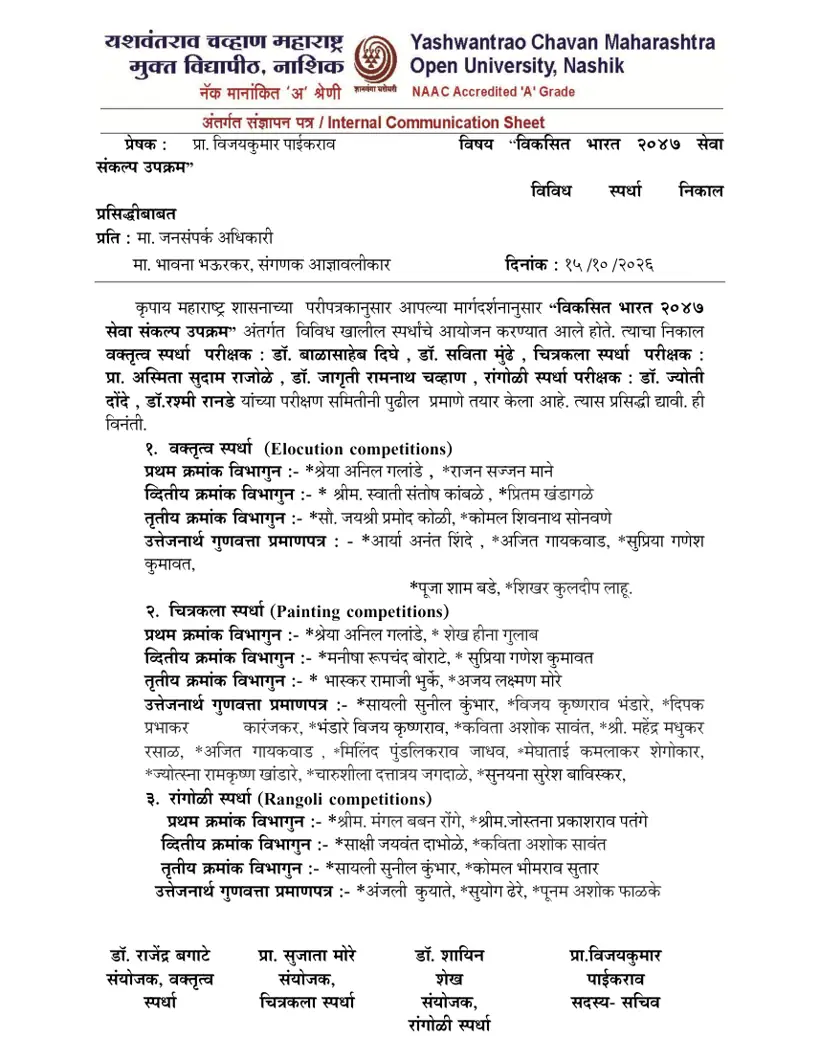
- YCMOU Viksit Bharat 2047 Competition Results 2026: Prize Winners Declared
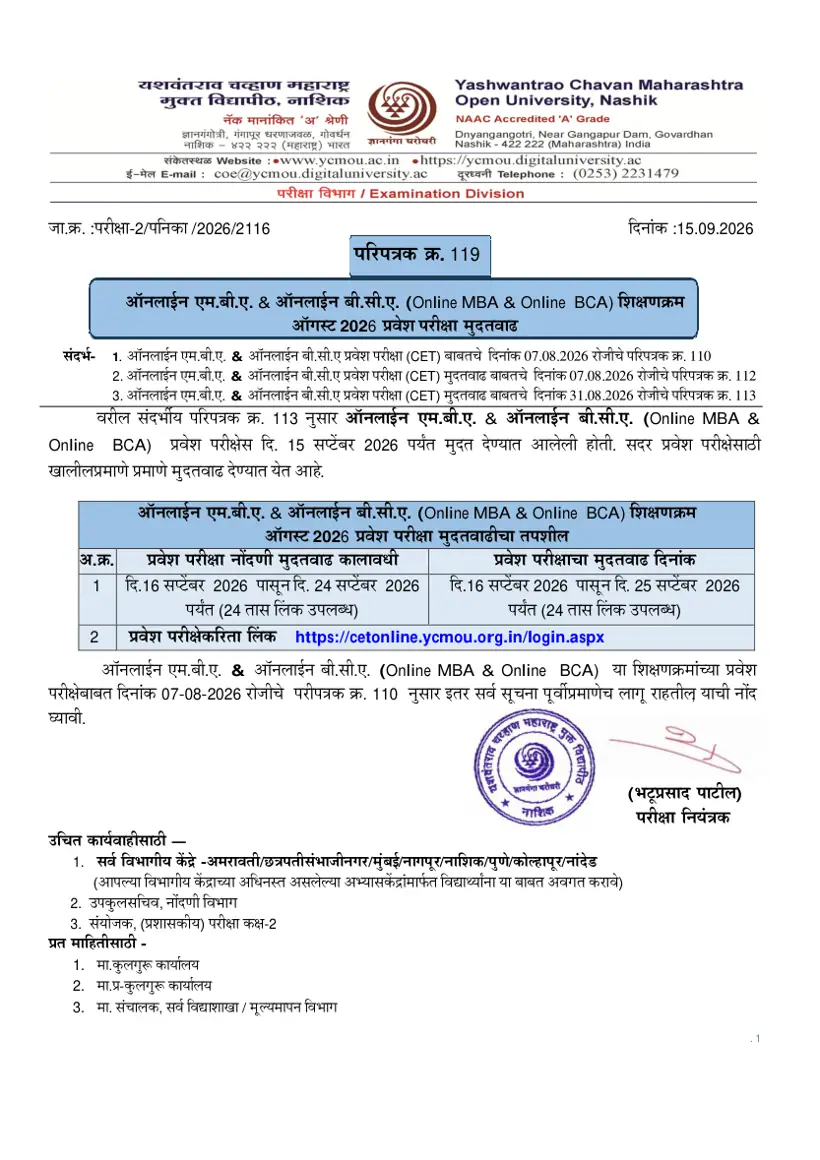
- YCMOU Online MBA & BCA CET Notification Released for July 2026 Admissions
- YCMOU August/September 2026 Online Exam Results Released
YCMOU Result 2026 PDF
- YCMOU Vikasit Bharat 2047 Seva Sankalp Competition Results 2026 PDF — Results announcement for elocution, drawing, and rangoli competitions organized under the Vikasit Bharat 2047 Seva Sankalp initiative.
- YCMOU Marksheet Sample Statement of Marks Document PDF — A sample statement of marks displays course grades and subject details for an examination conducted by the university.