
YCMOU Result 2026: How to Check Grade Card and Marks by PRN
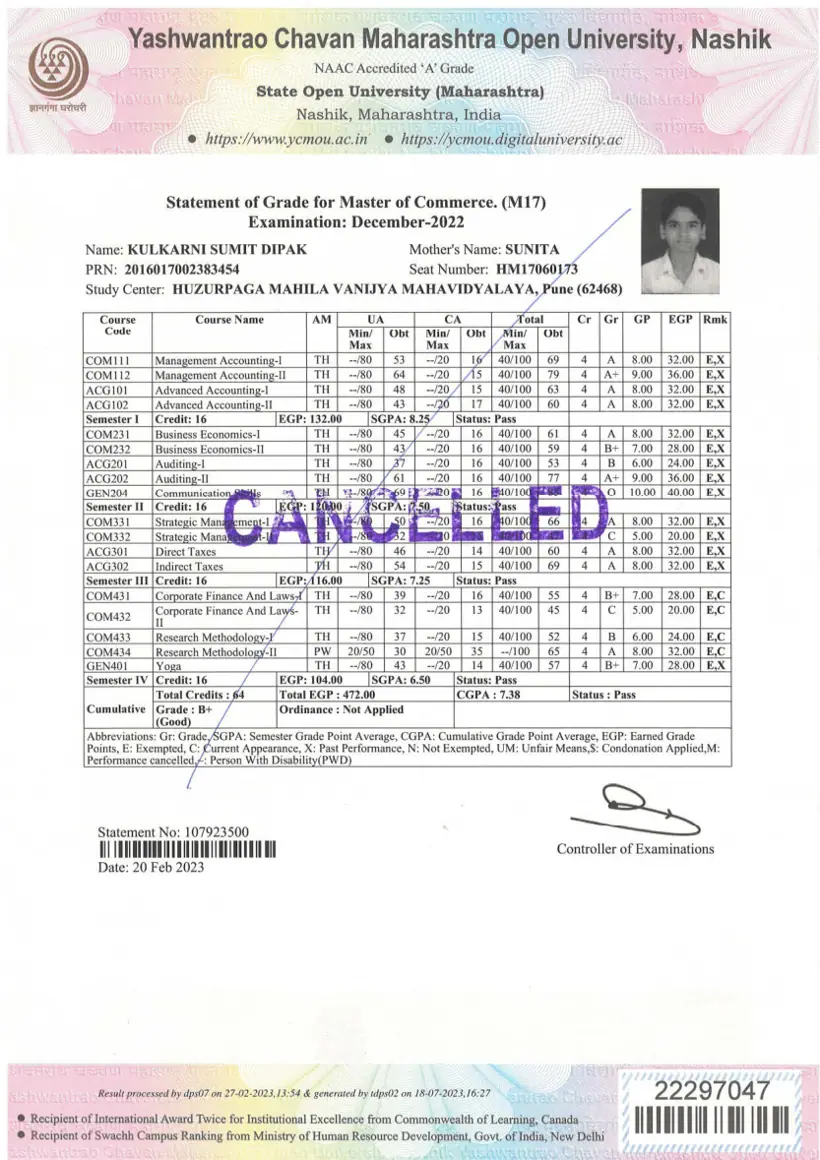
YCMOU publishes provisional term-end exam results online on ycmou.digitaluniversity.ac for distance and online learners. Candidates require a 16-digit Permanent Registration Number to view subject-wise marks and overall pass status. The printed Statement of Marks issued by the Controller of Examinations serves as the final official result document. Online applications for verification of marks, answer book scan copies, and revaluation open shortly after result declarations.
Yashwantrao Chavan Maharashtra Open University, also known as YCMOU Nashik, conducts distance and online semester and annual examinations for undergraduate, postgraduate, diploma, and certificate programmes across Maharashtra. For the 2026 academic sessions, candidates view provisional examination results online through the YCMOU digital university portal. Official printed Statement of Marks documents are dispatched to regional centers and study centers following online publication. Established under the YCMOU Act 1989, the university operates eight regional centers located in Amravati, Chhatrapati Sambhajinagar, Mumbai, Nagpur, Nashik, Pune, Kolhapur, and Nanded.
YCMOU Result 2026: August/September Online Exam Notice
YCMOU released online examination results for the August/September 2026 session on its official digital university portal. Candidates enrolled in distance and online learning programmes can view their provisional marksheets by entering their 16-digit Permanent Registration Number.
The Controller of Examinations notes that all online result displays remain provisional until physical marksheets reach candidates. Official printed Statement of Marks documents are processed separately and sent to study centers for distribution.
YCMOU Result: Overview and Online Portal System
YCMOU conducts term-end theory and practical examinations across various academic schools, including Humanities, Commerce, Sciences, Education, and Agriculture. Students access examination schedules, hall tickets, and mark lists through dedicated links on the YCMOU results main page.
The online exam portal categorizes result links by exam event and academic discipline. Candidates select their specific exam session from top navigation links to access active programme mark sheets.
YCMOU Result 2026: Important Portal Highlights
YCMOU manages examination data digitally across all eight regional centers in Maharashtra. Key parameters governing result publication and portal search credentials are detailed below.
Candidates must ensure their 16-digit PRN is entered correctly without hyphens or spaces to retrieve valid exam records.
YCMOU Result System Key Facts
| Fact Parameter | Official Detail | Source Portal / Location |
|---|---|---|
| University Name | Yashwantrao Chavan Maharashtra Open University | ycmou.digitaluniversity.ac |
| Search Credential | 16-Digit PRN (e.g. 2024017000000000) | Student Search Form |
| Document Status | Online Result is Provisional; Printed SoM is Final | Controller of Examinations Notice |
| Regional Jurisdictions | Nashik, Pune, Mumbai, Nagpur, Amravati, Nanded, etc. | YCMOU Regional Directory |
More from YCMOU
How to Check YCMOU Result Online?
Candidates check provisional results by navigating through the YCMOU digital university examination portal. Following the step-by-step procedure ensures quick access to individual grade cards.
Ensure your 16-digit PRN is available before initiating the online result search process.
- Open the YCMOU examination result portal on ycmou.digitaluniversity.ac in a standard web browser.
- Click on the relevant result session link, such as ‘May/June-2026’ or ‘August / September 2026 (Online) Exams’.
- Locate your specific programme code and programme title from the published result list.
- Click the corresponding ‘Click Here’ link to open the candidate result search interface.
- Select the exam event from the drop-down menu and enter your 16-digit Permanent Registration Number.
- Click the search button to view and download your provisional grade card.
Details Mentioned on YCMOU Grade Card and Marksheet
The provisional grade card generated online displays comprehensive academic and personal identity details. Candidates should verify all printed entries against their official admission records immediately after downloading.
Any discrepancies in candidate names or course codes should be reported to the study center coordinator for corrections before final marksheet printing.
- Candidate Full Name and PRN (16 digits)
- Programme Code and Programme Name (e.g., G01 Bachelor of Arts)
- Examination Event and Session (e.g., May/June 2026)
- Subject Codes and Course Titles
- Internal Assessment / Home Assignment Marks
- Term-End Theory and Practical Marks
- Total Marks Obtained and Subject Pass/Fail Status
- Provisional Result Status (Pass, Fail, or ATKT)
What to Do If YCMOU Result Is Pending or Shows Errors?
Students encountering blank screens, error messages, or unreflected marks during result searches can resolve common portal issues using university guidelines. Result delays usually stem from incorrect search inputs or ongoing mark processing.
If internal assignment marks are missing from your online grade card, verify that your study center submitted assignment evaluations within the academic calendar schedule.
- Verify PRN Digits: Ensure the 16-digit PRN is entered completely without trailing spaces.
- Check Exam Event Selection: Confirm that the selected exam event matches your appearing semester or year.
- Clear Browser Cache: Refresh the portal page or use an alternate web browser if search buttons fail to respond.
- Contact Study Center: Submit written complaints regarding missing internal or assignment marks to your study center head.
- Contact Regional Center: Visit the nearest YCMOU regional center if your result is withheld due to pending documentation.
YCMOU BA Result 2026: First, Second and Third Year Marks by PRN
YCMOU offers the Bachelor of Arts (BA) programme under code G01 across all study centers in Maharashtra. Students appearing for FYBA, SYBA, and TYBA term-end examinations access their annual and semester results online using their PRN.
Provisional mark lists for BA candidates are published by regional zones, including Nanded, Nashik, Pune, and Nagpur. The table below lists historical BA result dispatch tracking structures published by the university.
YCMOU BA Marksheet Dispatch Tracking Reports
| Programme Detail | Report Document | Dispatch Tracking Details |
|---|---|---|
| FYBA (G01) Nanded Region Part 1 | SoM Dispatch Report 2016 | Postal Speed Post Tracking Codes (EX…IN) |
| FYBA (G01) Nanded Region Part 2 | SoM Dispatch Report 2016 | Serial Range 18001 to 22048 Dispatched |
| FYBA Road Transportation (G64) Sem 2 | Report 178 Dispatch Status | Dispatched via Postal Tracking |
YCMOU Marksheet Download: Dispatch Status and Postal Tracking
YCMOU dispatches official printed Statement of Marks documents via Speed Post to regional distribution hubs and study centers. Candidates track physical marksheet delivery using tracking codes published on the YCMOU marksheet dispatch portal.
Each dispatch report lists candidate PRNs, programme codes, unique marksheet numbers, postal tracking codes, and dispatch dates. Candidates collect their original hard-copy marksheets directly from their allotted study centers.
Sample YCMOU Marksheet Dispatch Report Structure
| PRN | Program Code | Marksheet No. | Dispatch Date |
|---|---|---|---|
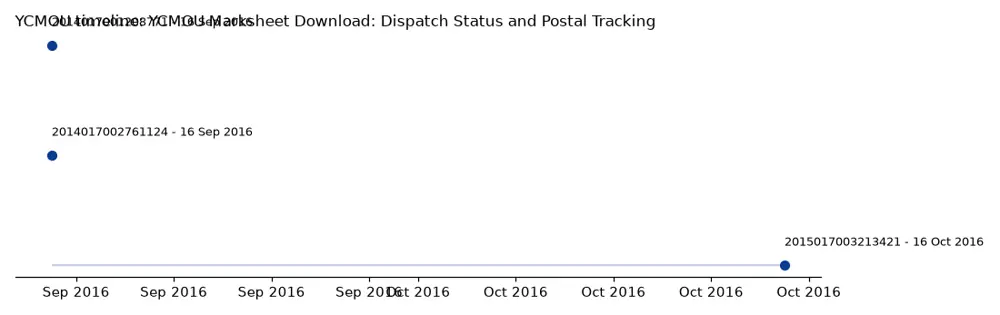
| 2015017003213421 | C97 (Fire Safety) | AC97000020 | 16-10-2016 |
| 2014017002761124 | G10 (Gandhian Thought) | AG10000001 | 16-09-2016 |
| 2014017001208771 | C36 (CCUM) | AC36000002 | 16-09-2016 |
YCMOU Revaluation and Verification: Online Application Rules
Students dissatisfied with their term-end examination marks can apply online for marks verification, answer book scan copies, or revaluation. Applications must be submitted through the digital university portal within advertised deadline windows.
For the May/June 2022 examination session, YCMOU opened online verification and revaluation applications on 19 August 2022, extending the submission deadline to 31 August 2022 and 15 September 2022. YCMOU has not published the revaluation fee per paper for the 2026 session on its portal as of 25 November 2026.
YCMOU ABC ID Registration: DigiLocker Credit Mapping Rules
YCMOU requires all enrolled students to create and link an Academic Bank of Credits ID for credit tracking under National Education Policy guidelines. Students generate their 12-digit ABC ID using the DigiLocker portal at abc.gov.in.
Candidates register on DigiLocker using their Aadhaar-linked mobile number, generate an OTP, set a 6-digit PIN, and obtain their unique ABC ID. The generated ABC ID must be submitted to your study center for official record mapping.
- Visit the official Academic Bank of Credits portal at www.abc.gov.in.
- Click on ‘My Account’ and select the ‘Student’ option.
- Sign in using existing DigiLocker credentials or click ‘New User? Sign up for Meri Pehchan’.
- Enter your Aadhaar-registered mobile number and click ‘Generate OTP’.
- Verify the received OTP and complete identity verification details.
- Create a unique username and a 6-digit security PIN to complete registration.
- Copy the generated 12-digit ABC ID and submit it to your study center.
YCMOU Result 2026: Next Steps for Learner Progress
Candidates who pass all term-end subjects should download their provisional grade cards and collect their original Statement of Marks from their study center. Candidates with backlogs must monitor circulars regarding re-examination form submissions.
Ensure your official postal address and mobile numbers are updated in your student login profile to receive official university communications without interruption as of 25 November 2026.
What students ask about YCMOU Result
How can I check YCMOU results?
Candidates check YCMOU results by visiting the YCMOU examination result portal on ycmou.digitaluniversity.ac and selecting their exam session. Entering the 16-digit Permanent Registration Number and clicking search displays the provisional grade card.
Does YCMOU delay result declarations?
YCMOU declares examination results online in phases following term-end evaluations. Academic calendars specify expected result windows, such as December for summer session term-end exams and June for winter session term-end exams.
Does YCMOU delay results?
YCMOU publishes provisional term-end exam results progressively on its digital university portal. Physical Statement of Marks documents are printed and dispatched to regional centers following online publication.
Is YCMOU a recognized government university?
YCMOU was established by the Government of Maharashtra under the YCMOU Act 1989 and holds UGC-DEB approvals. Degrees and diplomas awarded by YCMOU are recognized for government employment and academic pursuits.
How do I check YCMOU BA 3rd year result by PRN number?
Students check YCMOU Bachelor of Arts third-year results by selecting the relevant exam event on the YCMOU results page. Entering the 16-digit PRN displays subject-wise marks and final pass status.
How can I track my YCMOU physical marksheet dispatch status?
Candidates track physical marksheet dispatches by checking published dispatch reports on the digital university portal. These PDF reports list candidate PRNs, marksheet numbers, postal Speed Post tracking codes, and dispatch dates.
What credentials are needed for YCMOU digital university login result?
Checking online provisional results requires only your 16-digit Permanent Registration Number and selection of the correct examination event. Logging into the student portal provides access to profile details and hall tickets.
How do I apply for YCMOU marks verification and revaluation?
Students apply for marks verification, scan copies, or revaluation online through the digital university portal within advertised university windows. Deadlines are notified on the portal following result declarations.
How do I generate an ABC ID for YCMOU?
Students generate a 12-digit Academic Bank of Credits ID on the DigiLocker portal at abc.gov.in using Aadhaar verification. The generated ABC ID must be submitted directly to your study center.
Where to go on the YCMOU site
| What you can do | Official page |
|---|---|
| access YCMOU online examination result portal | ycmou.ac.in ↗ |
| view active session result links | ycmou.digitaluniversity.ac ↗ |
| check marksheet postal dispatch tracking status | ycmou.digitaluniversity.ac ↗ |
| view May/June 2022 results page archive | ycmou.ac.in ↗ |
| view July 2021 agriculture results page archive | ycmou.ac.in ↗ |
Key facts
- University Short Name
- YCMOU
- Latest Session Released
- August / September 2026 (Online) Exams
- Official Results Portal
- ycmou.digitaluniversity.ac
- Primary Search Credential
- 16-Digit PRN
- Headquarters Location
- Dnyangangotri, Near Gangapur Dam, Nashik – 422222
- Regional Centers Count
- 8 Regional Centers across Maharashtra
In this section
YCMOU Result official links and PDFs
- https://ycmou.digitaluniversity.ac/WebFiles/How%20to%20Genrate%20ABC%20ID.pdf PDF — DigiLocker Academic Bank of Credits ID generation guide PDF
- YCMOU Programme C97 Marksheet Certificate Dispatch Status Report 2016 PDF — C97 Programme Marksheet Dispatch Status Report PDF
- YCMOU G10 Programme Marksheet Dispatch Status Report September 2016 PDF — G10 Programme Marksheet Dispatch Status Report PDF
- YCMOU G64 First Year Semester 2 Marksheet Dispatch Report 2016 PDF — G64 FYBA Semester 2 Marksheet Dispatch Report PDF
- YCMOU C36 Programme Marksheet Dispatch Status Report September 2016 PDF — C36 Programme Marksheet Dispatch Status Report PDF